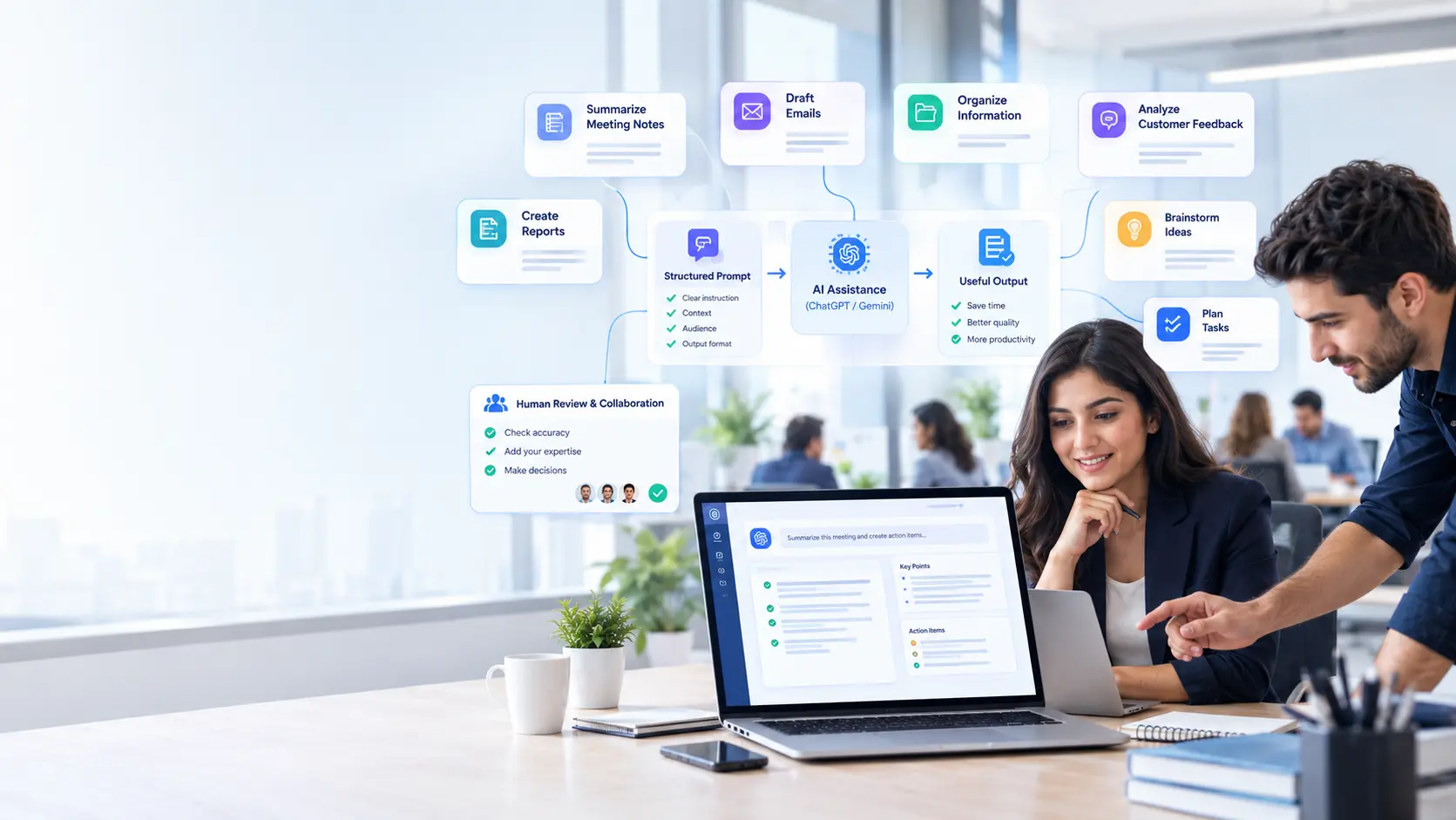
Employee productivity is not simply about working faster. In many workplaces, employees lose valuable time switching between tasks, searching for information, rewriting documents, preparing routine communications, and figuring out how to turn an idea into a usable deliverable.
AI tools can reduce some of that friction, but output quality often depends on the quality of the instruction. A vague request may produce something generic that still requires extensive editing. A well-designed prompt can give an AI system the context, constraints, and desired outcome needed to produce a much more useful first draft.
That makes AI prompts for employee productivity more than a technical skill. They are becoming a practical workplace skill that can help employees organize information, communicate more clearly, and complete repetitive tasks more efficiently.
What Makes an AI Prompt Useful at Work?
A useful workplace prompt tells the AI what to do and provides enough information to complete the task appropriately.
For example, instead of asking:
“Write a report about our meeting.”
An employee could write:
“Turn these meeting notes into a 500-word internal report. Organize it into key decisions, unresolved issues, assigned actions, and deadlines. Keep the tone professional and do not add information that is not included in the notes.”
The second prompt gives the AI a defined job, audience, format, length, and limitation. This reduces the amount of time employees spend correcting irrelevant or incomplete responses.
1. Reducing Time Spent on Repetitive Tasks
Many office tasks are repetitive without necessarily being simple. Employees may repeatedly draft emails, summarize meetings, rewrite announcements, organize notes, or create variations of the same document.
AI prompts can turn these recurring activities into structured workflows.
For example, an HR employee might prompt an AI tool to:
- Summarize interview notes
- Create a first draft of a job description
- Turn policy information into employee-friendly language
- Prepare interview questions for a particular role
- Organize feedback into common themes
The employee still needs to review the result, particularly when the information is sensitive or consequential. However, starting with a useful draft can be considerably quicker than starting from a blank document.
2. Helping Employees Process Information Faster
Information overload is a productivity problem in its own right. An employee might receive a long email thread, meeting transcript, research document, or collection of customer comments and need to identify the important points quickly.
A prompt can make the task more specific:
“Summarize these customer comments into five recurring problems. For each problem, explain how frequently it appears based only on the supplied comments and include a short example.”
This is more useful than simply asking for a “summary” because it tells the AI what information matters.
The employee can then inspect the original material and verify the important findings rather than manually sorting through every line before knowing where to focus.
3. Improving Workplace Communication
Writing can consume a surprising amount of working time, especially when employees need to adjust the same message for different audiences. AI prompts can help employees create first drafts of:
- Internal announcements
- Customer emails
- Project updates
- Meeting agendas
- Follow-up messages
- Training materials
- Executive summaries
The key is to describe the communication goal rather than simply asking the AI to “make it professional.”
For example:
“Rewrite this update for senior managers. Keep it under 200 words, focus on the project’s current status and risks, and end with the two decisions that require management approval.”
The employee remains responsible for accuracy and judgment, but the AI can handle much of the initial wording and organization.
4. Making AI Responses More Consistent
Different employees may approach the same repetitive task in completely different ways. That can make workplace output inconsistent.
Reusable prompts can provide a basic structure.
Consider a customer-service team that needs to summarize support tickets. A shared prompt might instruct the AI to identify:
- The customer’s main issue
- The urgency of the request
- Previous troubleshooting
- The recommended next step
- Any information still required
Instead of every employee inventing a different approach, the team has a repeatable framework.
This is one reason businesses should think about AI literacy alongside AI tools. Employees can learn AI literacy through Technisaur by understanding how to give useful instructions, evaluate responses, and recognize when an AI-generated answer should not be trusted without further verification. Resources focused on practical AI and technology skills can also support employees who are developing these capabilities.
5. Supporting Faster Research and Brainstorming
AI can also help employees get past the blank-page problem. Suppose a marketing employee needs ideas for a campaign. Instead of asking:
“Give me marketing ideas.”
A stronger prompt might be
“Generate 10 campaign concepts for a software company targeting small businesses. Focus on educational content rather than discounts. For each concept, provide a headline, core message, and suggested content format.”
The employee now has a set of starting points that can be evaluated and developed.
This does not mean every generated idea is good. In fact, human judgment becomes especially important during brainstorming because AI can produce ideas that sound plausible but lack originality, feasibility, or knowledge of the company’s actual customers.
6. Turning Complex Tasks Into Smaller Steps
Some workplace requests are too broad to handle effectively in one instruction. Instead of asking an AI system to “create a business strategy,” employees can divide the task into stages:
- Identify the business objective.
- Analyze the available information.
- Identify potential problems or opportunities.
- Generate possible approaches.
- Compare the approaches against defined criteria.
- Turn the selected approach into an action plan.
This approach makes the work easier to review. If something goes wrong, employees can identify which stage needs correction instead of throwing away the entire output.
7. Saving Time Without Removing Human Oversight
There is an important distinction between productivity and simply producing more AI-generated content.
An employee who accepts every AI response without checking it may work quickly but create new problems. AI systems can misunderstand context, make factual errors, misinterpret instructions, or present uncertain information confidently.
For workplace use, employees should generally:
- Verify important facts.
- Review calculations and data.
- Check names, dates, and figures.
- Remove unsupported claims.
- Protect confidential information.
- Apply professional and organizational judgment.
AI should reduce unnecessary effort not eliminate responsibility.
How Can Employees Write Better Productivity Prompts?
A practical prompt structure is
Task + Context + Audience + Constraints + Output format
For example:
“Create a weekly project update for our internal product team. Use the notes below as the only source of information. Highlight completed work, current blockers, and next week’s priorities. Keep it under 300 words and use clear bullet points.”
This format works because the employee has defined what the AI should do and what a successful answer should look like. Over time, teams can build prompt libraries for recurring tasks. These do not need to be complicated. Even a collection of well-tested prompts for emails, meeting summaries, research, customer support, and reporting can save employees from repeatedly reinventing the same instructions.
Final Thoughts
AI prompts can improve employee productivity because they help turn broad requests into specific, structured tasks. Instead of treating AI as a tool that magically produces finished work, employees can use it as a practical assistant for drafting, organizing, analyzing, and refining information. The biggest gains often come from ordinary workplace tasks rather than spectacular use cases. A clearer email, a faster meeting summary, a better-organized report, or a useful first draft can each save a few minutes. Across a team, those small improvements can add up. The goal is not to replace thoughtful employees with better prompts. It is to give those employees better tools for spending their time on work that requires judgment, creativity, communication, and decision-making.
Frequently Asked Questions
How do AI prompts improve employee productivity?
AI prompts improve productivity by giving employees a faster way to complete tasks such as drafting, summarizing, organizing, brainstorming, and rewriting. Clearer prompts generally produce more useful outputs and reduce unnecessary editing.
What should an employee include in an AI prompt?
Employees should usually include the task, relevant context, intended audience, important constraints, and preferred output format. Not every prompt needs all five, but important tasks benefit from clear instructions.
Can AI completely automate employee tasks?
Some repetitive tasks can be heavily assisted or partially automated, but complete automation is not appropriate for every situation. Human review remains important when tasks involve sensitive information, important decisions, factual accuracy, or organizational accountability.
Are longer AI prompts more effective?
Not necessarily. A long prompt is useful when it provides relevant context or precise requirements. Extra instructions that do not contribute to the task can make the request unnecessarily complicated.
How can companies help employees learn effective prompting?
Companies can provide practical training, create examples for common workflows, establish guidelines for responsible AI use, and encourage employees to review and refine prompts based on actual results. Teaching employees how to evaluate AI output is just as important as teaching them how to write prompts.